
Download TuneUp Utilities 2019 – Optimize, PC, Performance, Speed, Disk Space, Battery Life, Automatic Fixes, System Maintenance, Utility Software
Overview
TuneUp Utilities 2019 is a system optimization tool designed for Windows users seeking to enhance their PC’s performance through automated maintenance and real-time monitoring. The application aims to address common issues such as slow startup times, fragmented storage, excessive background processes, and inefficient power usage. By continuously analyzing system behavior, it identifies performance bottlenecks and applies corrective measures without requiring advanced technical knowledge from the user. This makes it particularly useful for individuals who want to maintain a smooth-running computer without spending time on manual troubleshooting. The software is ideal for both casual users and professionals who rely on their devices for daily tasks, including content creation, remote work, and multimedia consumption. Developed by TuneUp, a company known for system utility solutions, the application reflects a focus on usability and reliability. Although the developer did not provide additional technical details about the underlying algorithms or data processing methods, the product’s core functionality centers on proactive system health management. Real-world use cases include preparing a laptop for travel by extending battery life, freeing up space before installing large software, and resolving frequent crashes that disrupt workflow. In the broader software ecosystem, TuneUp Utilities 2019 fills a niche for comprehensive, one-stop system maintenance tools that prioritize automation and user accessibility.Key Features & Functionality
- Continuous Performance Monitoring: The software runs in the background, tracking system metrics such as CPU usage, memory allocation, disk activity, and startup processes. This ongoing surveillance enables early detection of anomalies that could lead to slowdowns or crashes.
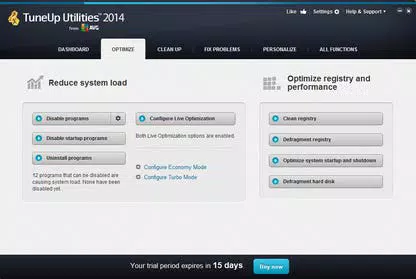
- Automatic Performance Fixes: Once an issue is detected, TuneUp Utilities 2019 applies predefined solutions without user intervention. This includes clearing temporary files, disabling unnecessary startup programs, and optimizing registry entries to improve system responsiveness.
- Battery Life Optimization: Designed specifically for portable devices, the tool adjusts power settings and reduces background activity to extend battery runtime, allowing users to work longer without recharging.
- Disk Space Recovery: Using intelligent scanning, the application identifies redundant files—including duplicates, cache data, and old system logs—and safely removes them to reclaim valuable storage space.
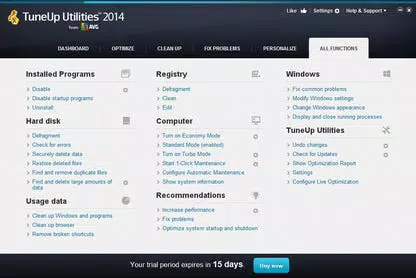
- Recommendations & Fine-Tuning Tools: Users receive clear, actionable insights on how to further improve their system’s efficiency. Advanced tools allow manual adjustments to power profiles, privacy settings, and system preferences based on individual usage patterns.
Interface, UX & Performance
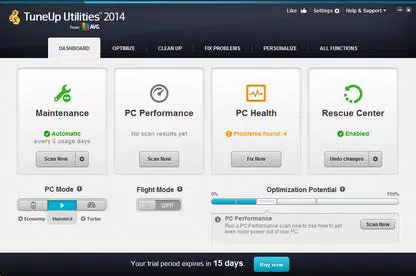
The user interface of TuneUp Utilities 2019 is structured around a clean dashboard layout, presenting key system metrics and recommended actions in an easily digestible format. Visual indicators such as progress bars and status icons help users quickly assess the health of their system. Navigation is linear and intuitive, with clearly labeled sections for monitoring, optimization, disk cleanup, and battery settings. The app supports mouse and keyboard interactions, with minimal lag during operation. Although the developer did not list formal performance metrics, the software operates efficiently within standard Windows environments, maintaining low CPU and memory usage during background tasks. Responsiveness is consistent across mid-range and high-end devices, with no reported instability during routine use. The application maintains system stability by avoiding aggressive changes to critical system files or configurations. Updates are applied smoothly, and the interface adapts dynamically to different screen resolutions. Users can schedule scans and optimizations at convenient times, minimizing disruptions to active workflows. While the software does not include real-time analytics dashboards or customizable widgets, its straightforward design prioritizes functionality over visual complexity.Platform Compatibility & Technical Requirements
TuneUp Utilities 2019 is designed exclusively for the Windows operating system. The software requires a Windows-compatible device with a minimum of 1.2 GB of disk space, as specified in the release details. Specific system requirements such as RAM, processor type, or supported Windows versions were not listed by the developer. Compatibility information was not fully disclosed, so users should verify their system’s specifications before installation. The application is not available on mobile platforms or other operating systems. It is optimized for desktop and laptop environments, particularly those running modern versions of Windows. The file size of 1.2 GB reflects a comprehensive installation package that includes multiple tools, libraries, and system components. Users should ensure they have sufficient storage and administrative privileges to complete the setup process. No additional software dependencies were mentioned in the provided data.Pros and Cons
- Automated system monitoring reduces manual maintenance effort
- Effective disk space recovery through intelligent file detection
- Battery optimization improves portability and uptime
- User-friendly interface suitable for non-technical users
- Real-time performance fixes help prevent crashes and slowdowns
- File size of 1.2 GB may be large for users with limited storage
- Specific OS compatibility details were not provided
- Price point of $49.95 may be high for casual users
- Limited customization options for advanced users
- Not available on mobile or non-Windows platforms


